
How to reset the MMSI of your Garmin AIS 600
So, you bought a new boat, it comes with a Garmin AIS 600, and now you need to change the MMSI. What to do now?
Under normal circumstances, you would need to return the AIS 600 back to Garmin, wait a few days, pay a fee and wait until they mail it back. This is nonsense!
Not for the fee, but just because you need to remove the unit out of the vessel and pray that the post will not lose a $1000 device. And what a device!!!
The AIS 600 is one of the best ever so, in this page, you will be able to reset the MMSI of your Garmin AIS 600.
✅ You don’t need to remove it from the vessel. Just connect the Garmin AIS 600 to a PC via USB, and we will provide you the necessary files to make the change on the fly.
✅ It takes 1 minute to install and a few seconds to reset the unit. You will be able to enter a new MMSI again and again, the boat name, length, type, etc., as if it was the first time.
✅ You don’t need to have the original Garmin AIS 600 Software CD.
Furthermore, you can repeat the process as many times as you want, and it works with any version of the Garmin AIS 600. As soon as you complete the purchase, you can download the required files.
Do NOT send your AIS 600 to Garmin. You can reset your MMSI without removing it from your boat!
Complete your order and within minutes, your Garmin AIS600 is under your control"
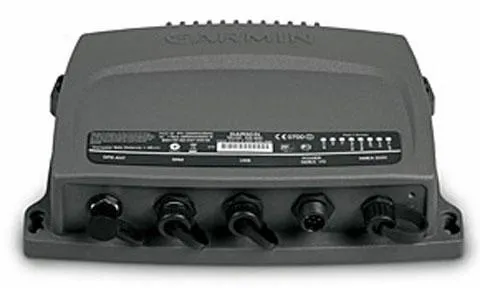
Here's what you get:
Link to Download the AIS 600 Management Software:
You don't need any CD from Garmin. Just download this tool, and you will be able to reset the MMSI of your AIS600
Do not remove the AIS600 from your boat
Just connect it using a USB cable to a Windows based PC and within a minute you will reset your MMSI, callsign and boat name
You can repeat as many times as you want
When you first buy the Garmin AIS600 you could setup the MMSI, Callsign and Boat name just one time. Now, you can change it as many times as you want!
Don't send it back to your Garmin dealer.
You are in control. Just get the software, follow the instructions and the Garmin AIS600 gets a new life!
Today Just
$97 one time

"Best purchase ever!"
"Finally cracked the code to reset the MMSI of my Garmin AIS600. I bought a new boat and would never leave this piece of technology behind. Thanks guys! - you saved my life!" - David C., Captain
STILL GOT QUESTIONS?
Frequently Asked Questions
Do I need to remove the AIS600 from the boat?
No. Just connect it to a laptop running Windows and the provided tool that you get from us, follow the instructions and you are ready!
Does it involve to open the device and some hardware skills?
No, all is done by software. The only contact with hardware you will have is to connect the AIS to a USB cable.
Can I reset the MMSI, Callsign and Boat Name just one time?
No, you can change these details as many times as you want!
Copyrights 2025 | Lickfold Digital Company | Terms & Conditions